The General tab controls plan visibility, stock cost warnings, optimization level, and general program behavior.
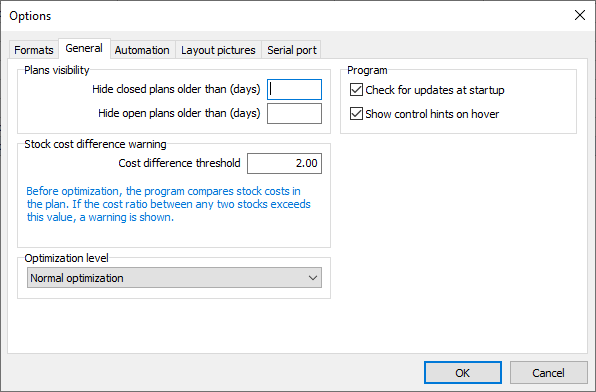
Plans visibility
Hide closed plans older than (days): Hides closed plans whose creation date is older than the specified number of days.
Hide open plans older than (days): Hides open plans whose creation date is older than the specified number of days.
These settings hide plans from view without deleting them.
Stock cost difference warning
Cost difference threshold: Sets the maximum allowed ratio between the highest and lowest stock costs in a plan before a warning is shown. The check runs before optimization and helps identify incorrect or inconsistent costs.
For example, a threshold of 2 triggers a warning when the highest stock cost is more than twice the lowest.
Optimization level
Select the balance between optimization speed and the search for better cutting layouts:
•Fast optimization: Prioritizes speed.
•Normal optimization: Balances speed and solution quality.
•Deep optimization: Spends more time searching for better solutions.
A higher optimization level may improve the result, but requires more processing time.
Program
Check for updates at startup: Automatically checks for available updates when the program starts, at most once per day.
Show control hints on hover: Displays a short explanation when you pause the mouse pointer over a control that has a hint.