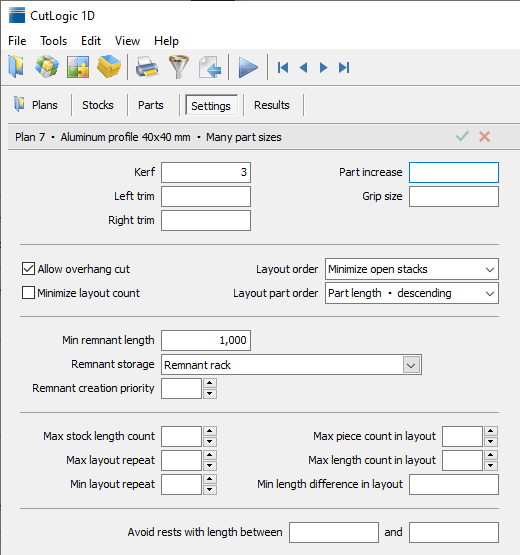
The Settings tab controls cutting dimensions, machine restrictions, the arrangement of layouts, and remnant creation for the selected plan. Start with the kerf and any required trims or grip, then adjust other settings only when your cutting process needs them.
Loading cutting settings from Materials
You can store reusable cutting settings for each material under Materials > Settings, for example for different saws, CNC processes, or production methods.
When you create a plan, its material's default cutting settings are loaded automatically. To load another predefined set of settings, press F4 to open Materials > Settings, select the desired settings, and press F4 again.
Cutting settings fields
Kerf
Width of material removed by a cut. Enter the actual cutting width for the blade or process you use.
Left trim / Right trim
Unusable material to remove from the left or right end of each stock before parts are placed. Use these values for damaged ends, end trimming, or other margins that must not become parts.
Part increase
Extra material added to each end of every part. For example, an increase of 2 adds 4 to the required cutting length. The original part length remains available as the finished dimension.
Grip size
Minimum remaining stock length needed for gripping during cutting. A final remainder shorter than the grip is normally not allowed unless the final piece can be used without another cut. For example, with a grip of 20, the final remainder may be zero or at least 20.
Allow overhang cut
Allows a cut near the end of a stock even when the material remaining beyond the part is narrower than the full kerf. Part of the cutting width can extend beyond the stock end. Use this only if your cutting equipment and process permit it.
Minimize layout count
Gives more importance to reducing the number of distinct cutting layouts. This can reduce machine setup and handling work, sometimes at the expense of material utilization.
Layout order
Controls the order in which optimized layouts are presented and processed. Minimize open stacks reduces the number of different part sizes that remain open simultaneously during plan cutting. You can also order by stock length or layout repeat.
Layout part order
Controls the ordering of parts within a layout for display and production output. Choose an order appropriate to how parts are handled or sorted after cutting. Default sorting is part length descending.
Min remnant length
Minimum length of an offcut that is considered a reusable remnant. When the plan is closed, qualifying remnants are added to Inventory rather than treated as scrap.
Remnant storage
Storage location where the plan's newly created reusable remnants will be recorded when the plan is closed.
Remnant creation priority
Controls how strongly optimization favors creating reusable remnants instead of smaller offcuts. Higher values encourage remnant creation; use a lower value if preserving larger offcuts is not important to your process.
Max stock length count
Limits the number of different stock lengths the optimizer can use in one plan. Use this to reduce the variety of stock lengths needed for production.
Max layout repeat
Limits how many times a single cutting layout can be repeated. Can be set to bundle size.
Min layout repeat
Encourages layouts that can be repeated at least the specified number of times. Useful when repeatedly setting up a machine for one-off layouts is inefficient.
Max piece count in layout
Limits the total number of parts in a single cutting layout.
Max length count in layout
Limits the number of different part lengths included in one layout.
Min length difference in layout
Requires different part lengths within one layout to differ by at least the specified amount. Identical lengths are still allowed. This can make sorting and identifying cut parts easier.
Avoid rests with length between ... and ...
Instructs the optimizer to avoid finishing a stock with an offcut whose length is within the specified interval. Useful when certain remainder lengths are inconvenient to store, reuse, or process.
Leave optional restrictions empty when you do not need them. Adding too many constraints can reduce the range of layouts available to the optimizer and may increase cost or waste.